Plot Check and AI Review
A game plot is made of many rules, conditions and texts, and it is easy to miss that a scene can never be reached, that a reward promised in a text is never given, or that a quiz is far too hard for 10-year-olds. The Plot Check tab of Game Design reads your whole scenario and lists what may be wrong, before players find it.
It has two parts:
| Part | What it looks at | AI | Cost |
|---|---|---|---|
| Logic checks | The rules, run the way the player app will run them: what can never happen, who can get stuck | No | Free |
| AI review | What code cannot judge: whether texts match what the rules do, the story's order, language, age fit, quizzes | Yes | Paid from the game's AI budget |
The AI review is shown only in games where your administrator has enabled it.
Logic Checks
The logic checks run each time you open the tab (Check again runs them again). They check the scenario exactly as the player app will run it, with no AI: nothing is sent outside the platform, and every designer of the game sees them.
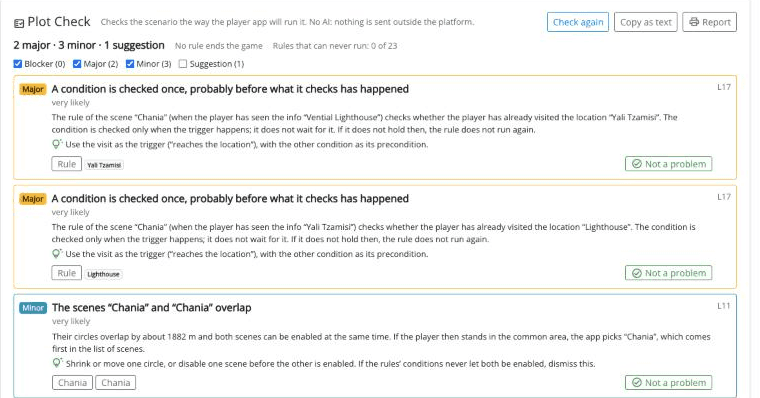
At the top, the counts by severity and two facts about the game (whether any rule ends it, and how many rules can never run). Untick a severity to hide its findings.
Each finding is a card with a severity:
| Severity | Meaning |
|---|---|
| Blocker | Some players cannot go on, or cannot finish. |
| Major | Likely to break part of the game for some players. |
| Minor | Worth a look; may be on purpose. |
| Suggestion | Harmless here; good to know. |
A card explains the problem in plain words and links to the elements it is about. On a card you can:
- open an element with its link, fix it and save; the finding goes away the next time the checks run;
- apply the fix in one click, when the check knows the exact change. The button names it: Turn on "Fire once" / Turn off "Fire once", Switch the rule on / off, or Move the rule to the universe. The rule opens with the change made, unsaved, shows what changed, and you Approve and save or Undo;
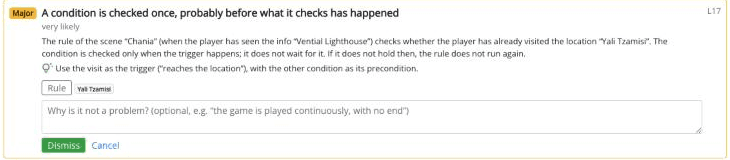
- press Not a problem when it is intended, or the check is wrong here: write why (optional, e.g. "the game is played continuously, with no end") and press Dismiss. The mark holds while the finding is about the same elements at the same severity; if the finding changes, it is shown again with your old note. Dismissed findings are listed apart, with Undo.
Show the game as the checks read it shows the scenario as the checks (and the AI review) read it. Copy as text copies the findings, e.g. to send to another designer.
When you publish, the confirmation lists the blockers that are not marked as Not a problem. It never stops you from publishing.
The AI Review
The AI review gives your whole scenario to a language model, which reviews it the way an experienced game designer or teacher would. It gets the results of the logic checks as facts, so it does not repeat them, and spends its effort on what code cannot judge.
What It Looks At
You choose one or both of its two passes:
Intent behind the rules
- Texts against rules: a text that says something the rules do not do, e.g. "you win 10 points" when the rule gives 5, "try again" where there is no second try, a reward promised and never given.
- Order: scenes or events in an order that contradicts the story the texts tell.
- Scoring: rewards or penalties that encourage the wrong behaviour, or are out of proportion.
- Promises: what the game's description, instructions or terms promise and the rules do not deliver.
- Intent: a rule that probably does not do what you meant, judging by the texts around it.
Story and texts
- Language, age fit (for the game's audience), coherence, fit with the game's description, pacing and quizzes.
Both passes also flag facts to check: a historical, scientific or geographic claim the model is not sure about. It never says the claim is wrong; it asks you to check it.
What You Can Trust
A model can be wrong, so the review follows the same rule as AI characters: the model judges, code checks.
- Every element a finding names must exist in your game, and every quote it gives must be found, word for word, in that element's texts. Findings with invented elements or quotes are dropped, and so are repeats of the logic checks. Under the results, each pass says how many findings it kept and how many the checks of evidence left out.
- A model's finding is never more than Major: only the logic checks can say that no player can finish.
- Findings of the AI review are marked AI (Found by the AI review).
"The AI review found nothing more" is not proof that the game is right: a model can miss things. Treat its findings as a second reader's notes, not as a verdict.
Running a Review
The review uses the game's AI settings: its provider and key, its spending limits, and the model chosen for the task Reviews the plot (Plot Check). Use a capable model: it reads the whole game at once. The game brief matters here: the review checks the scenario against what the game means to be, so say in the brief who the game is for and what players should come away with. The findings are written in the game's language.
If something is missing (no provider, no model, no key), the panel says what, with a button to Open the AI settings.
- Open Game Design → Plot Check → AI review. Above the button you see how big a review of this game is and what it costs at most, the game's AI spend today, and your reviews today.
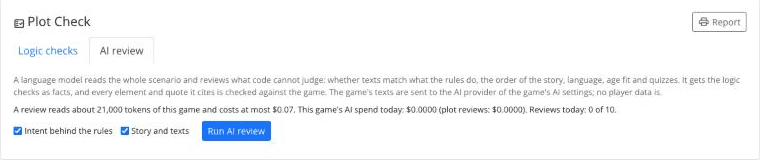
- Tick the passes you want and press Run AI review.
- The review runs on the server, and usually takes a few minutes. A progress bar estimates how far it is, from how long reviews with this model usually take (it turns orange with Taking longer than usual… when a pass runs late). You can leave the page: Stop waiting stops following it, not the review, and the result is there when you come back.
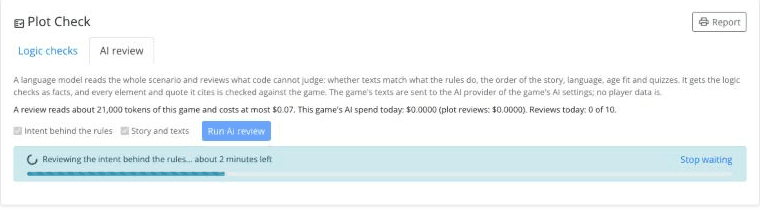
Only the game's designers can run a review, one at a time per game, and each designer up to 10 a day. Anyone who can see the game can read the reviews.
Reading the Results
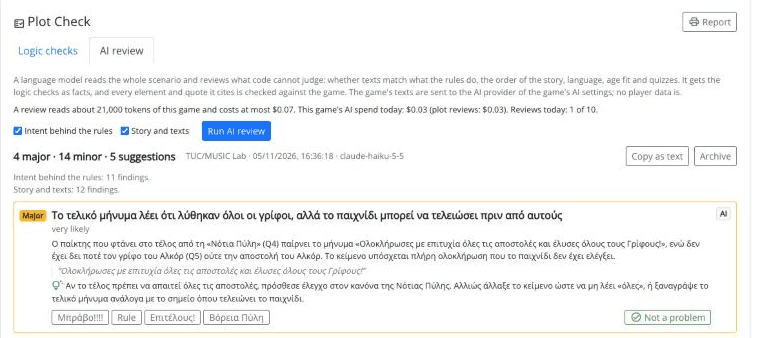
Findings are shown in cards, most severe first, like the logic checks. Each one has an explanation, a suggestion, the quotes from your texts it is based on, and links to the elements.
- Not a problem works as for the logic checks.
- Fix with AI (in games with AI drafting), on findings about texts, opens the element with the request filled in from the finding.
- When the game has changed since the review, a note says so: run it again to review the game as it is now.
- Earlier reviews lists the previous ones (when, who, which model, how many findings, cost). Archive hides a review you no longer need; Show archived reviews and Restore bring it back.
- Copy as text copies the findings.
Report (at the top of the tab) makes one printable page of the logic checks and the latest AI review, in the game's language, to print or save as PDF, e.g. for a teacher or a colleague. AI findings are marked in it, with a note that AI can make mistakes.
What is sent to the AI provider: the scenario of the game (its texts, elements and rules, in a readable form), the game brief, and the findings of the logic checks. No player data is sent. Every review is paid like the rest of the game's AI and counts towards the game's spending limits.