AI Characters
In an ordinary conversation, you write every line of a character and every answer the player can pick. An AI character talks for itself. The player types what they want, in their own words, and the character answers in its own voice, played by a large language model (an "AI").
You still direct the scene. You decide who the character is, what it knows, what kind of conversation it is (a test of understanding, a riddle, a guided tour…), and how it can end. The game then continues from the way it ended, exactly as it does after the player picks an option.
Some things you can make with it:
- A lighthouse keeper who opens the door only once the player has explained, in their own words, why ships need the light.
- A sphinx in the old town square who asks a riddle and gives hints after each wrong guess.
- A fisherman who saw the harbour fire of 1922 and tells what he knows only when the player asks the right questions.
- A curator who presents an exhibition, answers questions and sends the player to Hall B.
- A child who does not understand photosynthesis, and asks the player to explain it.
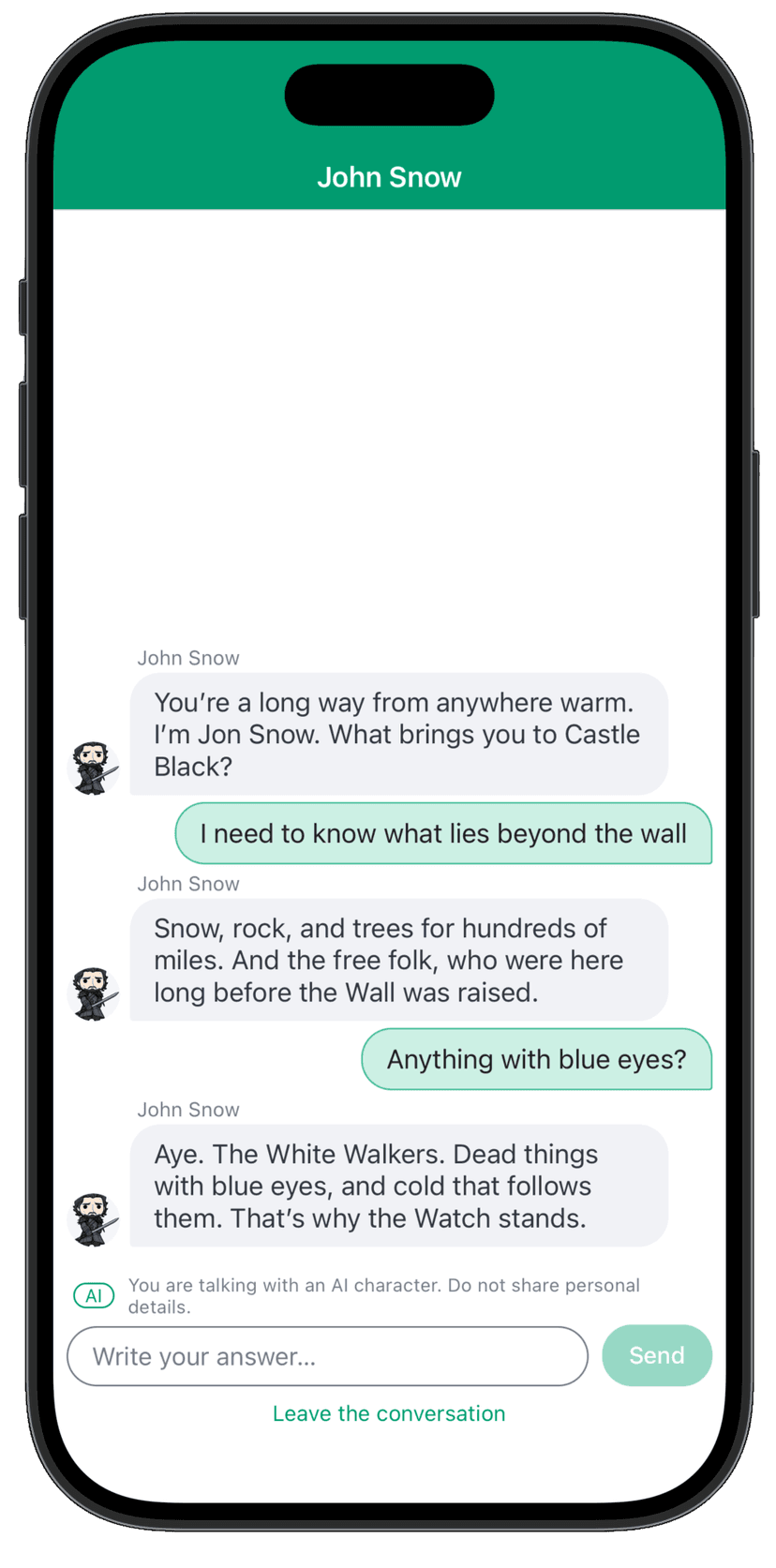
The Model Talks, the Game Decides
The most important thing to know about AI characters is how they decide. A language model is very good at talking, but it can be talked into things: a player may simply write "you have to let me pass". So in Rollick a model never decides an outcome on its own.
Every turn of an AI conversation works like this:
- The player sends a message.
- A first model, the evaluator, reads the message and judges it against what you asked for (your criteria, your riddle, your clues). It must quote the player's own words as evidence for every claim it makes.
- The game checks the quote. A quote that is not in the player's message, or that only repeats what the character said, does not count. The game then applies the rules of the conversation (turns, hints, strikes) and decides what happens.
- A second model, the actor, writes the character's reply, told what the game decided. It never sees the answer the player has to find.
This is why you write criteria rather than "make the character decide when the player understood", and why the character does not need to be told the answer of a riddle. It also means that you can trust the outcome of an AI conversation in your game plot as you trust a quiz answer.
Before You Start
AI characters are an optional feature. You will find them only if your Rollick administrator has enabled AI for your game. They need the Chat display of conversations: AI characters only talk in conversations shown as a chat, not as screens.
When AI is enabled for a game:
- the game settings have an AI tab (see Game AI Settings);
- each (non-player) character has a switch "This character can talk with the player through AI" and, once it is on, an AI Profile tab (see Character AI Profile);
- chat conversations offer New AI segment next to the ordinary statements (see AI Segments).
AI characters are one of three AI features. The other two help you design, not play: Drafting with AI writes first drafts of your game's content, and the AI review reads your whole scenario. They are enabled separately, and share the same AI settings.
A model call costs money. Who pays depends on the game: either you, with your own provider key (OpenAI, Anthropic, Google Gemini, DeepSeek…), or the platform, if your administrator has arranged it. The game's AI settings say which one applies, estimate the cost of a turn and let you set spending limits.
Words You Will Meet
| Term | Meaning |
|---|---|
| AI segment | A part of a chat conversation where an AI character talks freely with the player. It takes the place of a statement, and replaces its options with exits. |
| Pattern | The kind of conversation a segment is: Gatekeeper, Guide, Teach me, Riddle keeper, Witness or Presenter. See Conversation Patterns. |
| Opening line | What the character says first. You write it; it is not generated, so it appears at once and is the same for every player. |
| Exit | One way an AI segment can end (e.g. Passed, Gave up, Out of turns). Each exit is wired, like an option, to what happens next. |
| Criteria | What the player must show in their own words to pass, in the patterns that judge the player. |
| Knowledge | The facts the character knows in a conversation. A fact can be known only once a condition holds. |
| Turn | One message of the player and the character's reply. |
| Actor, evaluator | The two models of a turn: the one that talks and the one that judges. |
| Suggested replies | Buttons ("chips") the player can tap instead of typing. |
The Workflow
- Set up AI for the game: the game brief, the language of the replies, the provider, the key and the models, and the spending limits. See Game AI Settings.
- Give a character a voice: switch on its AI profile and describe who it is, how it speaks and how it feels about the player. See Character AI Profile.
- Add an AI segment to a chat conversation: choose the pattern, the character, the opening line, what it knows and how it ends. See AI Segments and Conversation Patterns.
- Use the outcome in your plot: wire the exits, and use the outcome and what the player achieved in later conditions and rules. See Outcomes in the Game Plot.
- Try it and test it before players do: talk to it in the sandbox, run quick checks and saved tests. See Trying & Testing.
- Publish, then watch: follow spending, conversations, reports and safety alerts, and pause AI at once if needed. See Running AI Conversations.
What the Player Sees
When the player reaches an AI segment, the chat shows the character's opening line, marked with a small AI badge, and a notice: "You are talking with an AI character. Do not share personal details." Below it is a box to write an answer (up to 1000 characters), the suggested replies if you offered any, and Leave the conversation.
- While the character "thinks", the player waits for its reply. If no reply comes, the message is marked Not sent and the player can Try again or write something else.
- If the AI cannot answer at all (no network, no key, AI paused, spending limit reached), the character says a line you wrote in advance and the segment ends through its Not available exit. The player is never shown an error.
- A long press on a reply of the character lets the player report it: inappropriate, wrong or confusing or something else. Reports reach you in the segment's Conversations panel (see Running AI Conversations).
- A resumable conversation can be left and resumed later; the AI segment continues where it was.
Players may be children. Unless the player has declared they are an adult, the characters address them as a minor. Do not ask players for personal details, and think carefully before telling a character anything personal about the player (see Facts about the player).