Object Spawning
The initial world places objects once, when a game instance starts. A spawner keeps placing them while the game is played, without a player or a game master dropping them. For example:
- coins that reappear in a park every 10 minutes, as players collect them;
- a treasure chest that shows up once, an hour after the game starts;
- mushrooms that grow in a forest scene every morning, and wither by the evening;
- extra supplies that appear only while at least 3 players are in the market square.
You create spawners in the design environment under Game World → Spawners. Every active game instance runs its own copy of each enabled spawner, with its own schedule and counters.
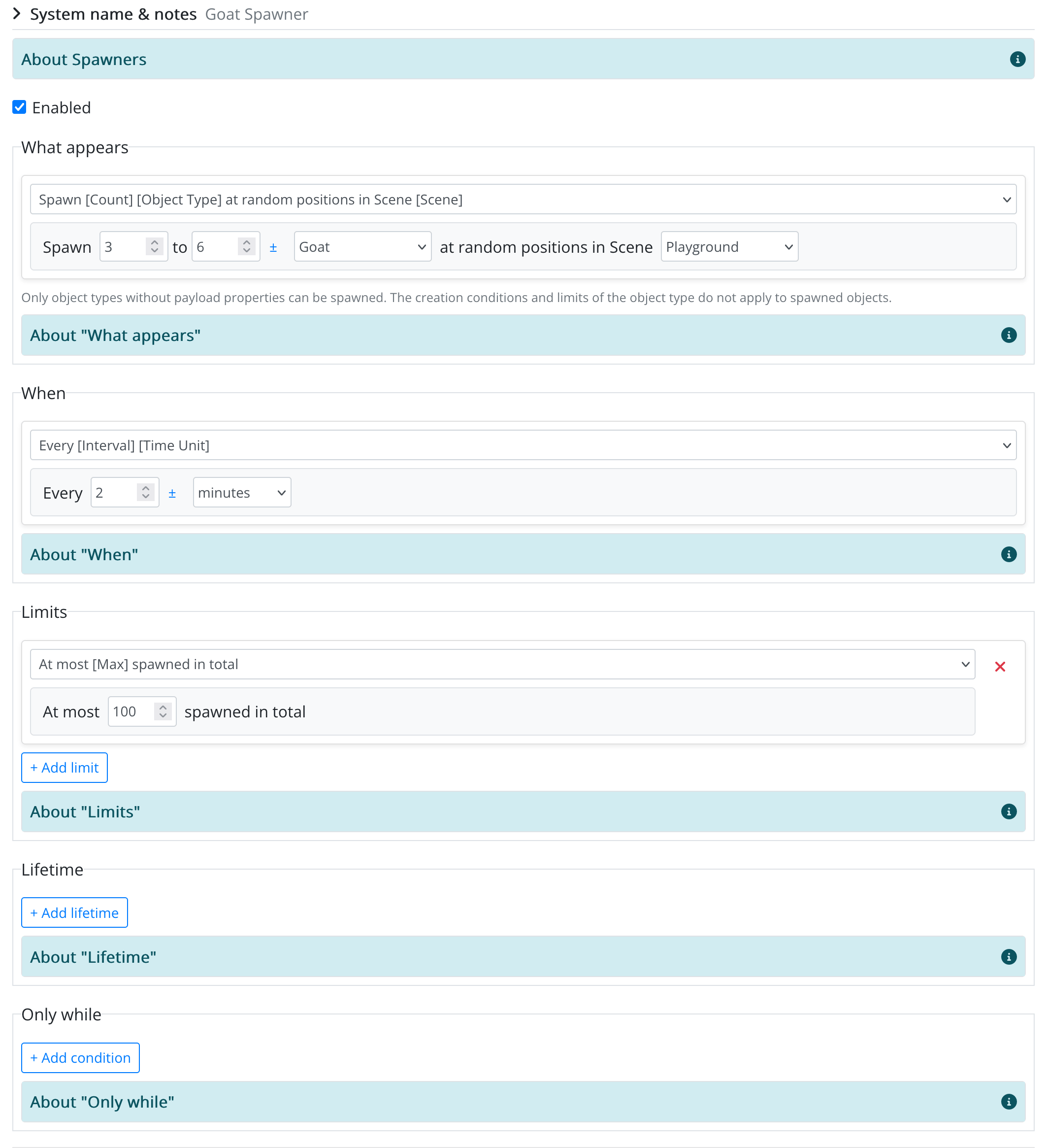
How a Spawner Runs
Each time a spawner runs in a game instance, it:
- checks its Only while conditions, and spawns nothing this time if any of them is false;
- picks how many objects to spawn, and lowers that number so that none of its limits is exceeded;
- places the objects, which players in that scene see right away.
Defining a Spawner
Give the spawner a name (and, if you like, notes), tick Enabled, and fill in its sections. Each section works like a condition: you pick a sentence and fill in the blanks.
Values with a ± button can be a range instead of a single number (e.g. Spawn 2–5 Coins). A new random value within the range is picked every time it is used: at every run for the count or the interval, and for every object for the lifetime.
What Appears
| Option | Places the objects… |
|---|---|
| Spawn [Count] [Object Type] at random positions in Scene [Scene] | anywhere within the area (center and radius) of the scene. |
| Spawn [Count] [Object Type] at Place [Place] | anywhere within the radius of the place. |
- Only object types without payload properties can be spawned, and never in the universe scene.
- A scene or place without a radius puts every object on the same spot.
- The creation conditions and limits of the object type do not apply. Spawned objects are shown as approved, even if the object type requires approval.
When
| Option | Runs… |
|---|---|
| Every [Interval] [minutes / hours / days] | regularly. The first run happens as soon as the spawner is picked up in a game instance. |
| Every day at [Time] | once a day, at a time in the game's time zone. |
| Once, [Delay] [minutes / hours / days] after the world starts | once. The delay counts from the start of the game instance; if that moment has already passed, it runs right away. |
| Whenever there are fewer than [Threshold] of them in the scene | every minute, while the scene holds fewer objects of this type than the threshold. It then spawns the full count, so the scene can end up above the threshold. |
Changing this section restarts the schedule in every game instance, as if the spawner were new, so a Once spawner runs once more.
Limits
Limits are optional; you can add several, and the strictest one wins. If there is no room left, the run spawns nothing.
| Limit | Counts… |
|---|---|
| At most [Max] objects of this type in the scene | all objects of this type in the scene right now, including those placed by players or by the initial world. |
| At most [Max] objects of this type in the whole world | the same, in the whole game world. |
| At most [Max] spawned per [hour / day] | what this spawner has spawned in the current hour or day. |
| At most [Max] spawned in total | everything this spawner has spawned in the game instance so far. |
Whatever the limits, a spawner never keeps more than 500 of its objects in one game instance.
Lifetime
Each disappears after [Duration] [minutes / hours / days]: each object gets its own expiry time when it is spawned, and is removed from the world (and from the players' screens) shortly after it. Changing or removing the lifetime only affects objects spawned afterwards.
Without a lifetime or a limit, objects pile up until players pick them up or destroy them.
Only While
Conditions that must all be true for the spawner to spawn. Conditions about "the scene" refer to the scene the objects are spawned in.
| Condition | True when… |
|---|---|
| At least [Players] players are in the scene | enough players currently have the scene open in the app. |
| There are [fewer than / at least] [Num] [Object Type] in the scene | the scene holds that many objects of the type, whoever placed them. |
| World [is / is not attributed with / has / does not have] Attribute [Attribute] | the game world has (or does not have) the attribute. Use it to switch a spawner on and off from your script rules. |
| The time is between [From] and [To] | the time of day, in the game's time zone, is in the range. A range like 22:00 to 06:00 wraps around midnight. |
Warnings
Below the form, the Studio warns you about settings that save fine but will probably not do what you expect, for example:
- nothing limits how many objects pile up in the world;
- the scene or place has no radius, so every object lands on the same spot;
- a limit is lower than the smallest count, so the spawner can never place a full batch;
- the objects can be neither picked nor destroyed and have no lifetime, so once a limit is reached the spawner never spawns again;
- the object type requires approval, but spawned objects are shown as already approved.
Good to Know
Spawners are not part of published game versions. Saving a spawner affects every active game instance of your game right away, whatever version it plays. Object types, scenes and places are looked up in the version each instance plays: if they do not exist there, the spawner fails in that instance.
- Spawners are checked every 30 seconds, so times are approximate. A new or newly enabled spawner starts in running game instances within about 5 minutes.
- Disabling a spawner pauses it and keeps its counters. Enabling it again restarts its schedule.
- Deleting a spawner does not remove the objects it already spawned, and they no longer expire.
- Spawned objects are world objects like any other: players see, pick and destroy them as usual. In the console they are marked as created by a spawner, and world patches leave them alone.
Example: Coins in the Park
A park scene should always hold a few coins to collect, but never flood:
- What appears: Spawn 2–4 Coins at random positions in Scene "Park"
- When: Every 10 minutes
- Limits: At most 12 objects of this type in the scene; At most 100 spawned per day
- Lifetime: Each disappears after 30–60 minutes
- Only while: The time is between 08:00 and 20:00
To see what your spawners are doing once players are playing, and why one is not spawning, use the Spawning panel of the Game Master Console.