Character AI Profile
Any non-player character of your game can be played by AI. Open the character and switch on This character can talk with the player through AI. The switch saves at once, and the character gets an AI Profile tab next to its General tab. Only characters whose AI profile is on can be chosen in an AI segment.
The AI profile says who the character is, in every conversation of the game. What it knows is not part of the profile: it belongs to each conversation, so the same character can know different things in different places and at different moments of the game.
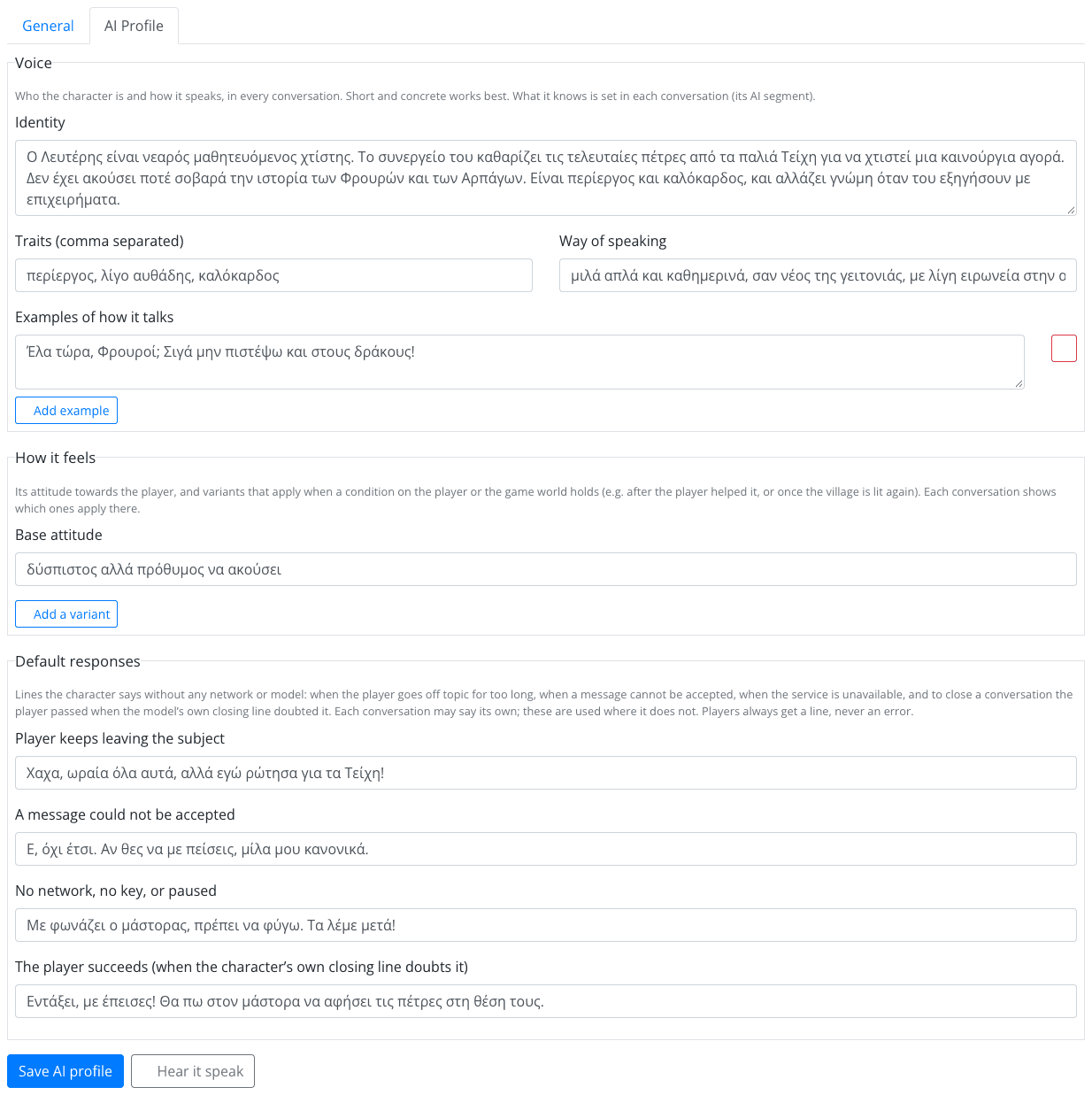
The profile is private: none of it reaches the player's device. Save it with Save AI profile; the draft is updated at once, and players get it with the next publish.
Voice
Who the character is and how it speaks. Short and concrete works best.
| Field | Example |
|---|---|
| Identity | Mr Fotis, the old librarian of the village school. He has seen generations of pupils. |
| Traits (comma separated) | patient, curious, a little grumpy |
| Way of speaking | warm, simple words, never more than three sentences |
| Examples of how it talks | A few lines in the character's voice, e.g. "Books don't bite, young one. Only librarians do." |
Examples are the most effective way to set a voice: the model imitates them. Write them in the language of the game.
How It Feels
| Field | What it does |
|---|---|
| Base attitude | The character's attitude towards the player, e.g. friendly but strict about the rules. |
| Variants | Other attitudes that apply only when a condition holds on the player or the game world, e.g. grateful and talkative once the player has completed the mission "Find the lost book". |
A variant's condition is built with the usual condition builder (Add a condition). Until then the variant is marked always; with a condition it is marked only when… (n conditions). A condition that is unfinished, or points at something that was deleted, never holds. Each AI segment can show which variants apply there (see What it would know).
Default Responses
Lines the character says without any model, so they work even when there is no network or no AI. Each conversation may say its own; these are used where it does not.
| Line | When it is said |
|---|---|
| Player keeps leaving the subject | The player went off topic too many times; the segment ends through its Off topic exit. |
| A message could not be accepted | The character's reply had to be withheld, e.g. because it would have given away something the player must find. The character says this instead and the conversation goes on. |
| No network, no key, or paused | The AI could not answer; the segment ends through its Not available exit. |
| The player succeeds (when the closing line doubts it) | The player passed, but the character's own goodbye sounded as if they had not. This line replaces it, so the player is never told the wrong thing. |
Leave a line empty to use the app's own line. Players always get a line, never an error.
Hear It Speak
Hear it speak asks the character three short questions, with the profile as last saved and the game's AI settings, and shows its replies. Use it to check the voice before you build a conversation around it. It is a real model call, paid like any other.
Change the voice here, in one place, and every conversation of the character follows. Put what the character should do in a particular conversation (e.g. "lead the player to the old well first") in that segment's Guidance, not in the profile.