Leaderboard
A leaderboard ranks your players by a score that you define. It is a simple way to drive competition, and it works in both single-player and multi-player games:
- In a single-player game, a player is ranked against everyone who played the same game version.
- In a multi-player game, a player is ranked against the other players of the same game instance.
Each game has at most one leaderboard. You define it in the Studio under Game World → Leaderboard, players see it in the Rankings screen of the player app, and game masters see the full ranking in the Game Master Console.
How the Score Is Built
You build the score in two steps:
- Variables measure each player, e.g.
points= the player's cash,duration= the time the player needed to complete the game, in seconds. - A formula turns the variables into a score, e.g.
points * 100 - duration / 60.
The server computes the score of every player from their saved game state whenever the leaderboard is opened, so the ranking is always current.
Making the Leaderboard Available
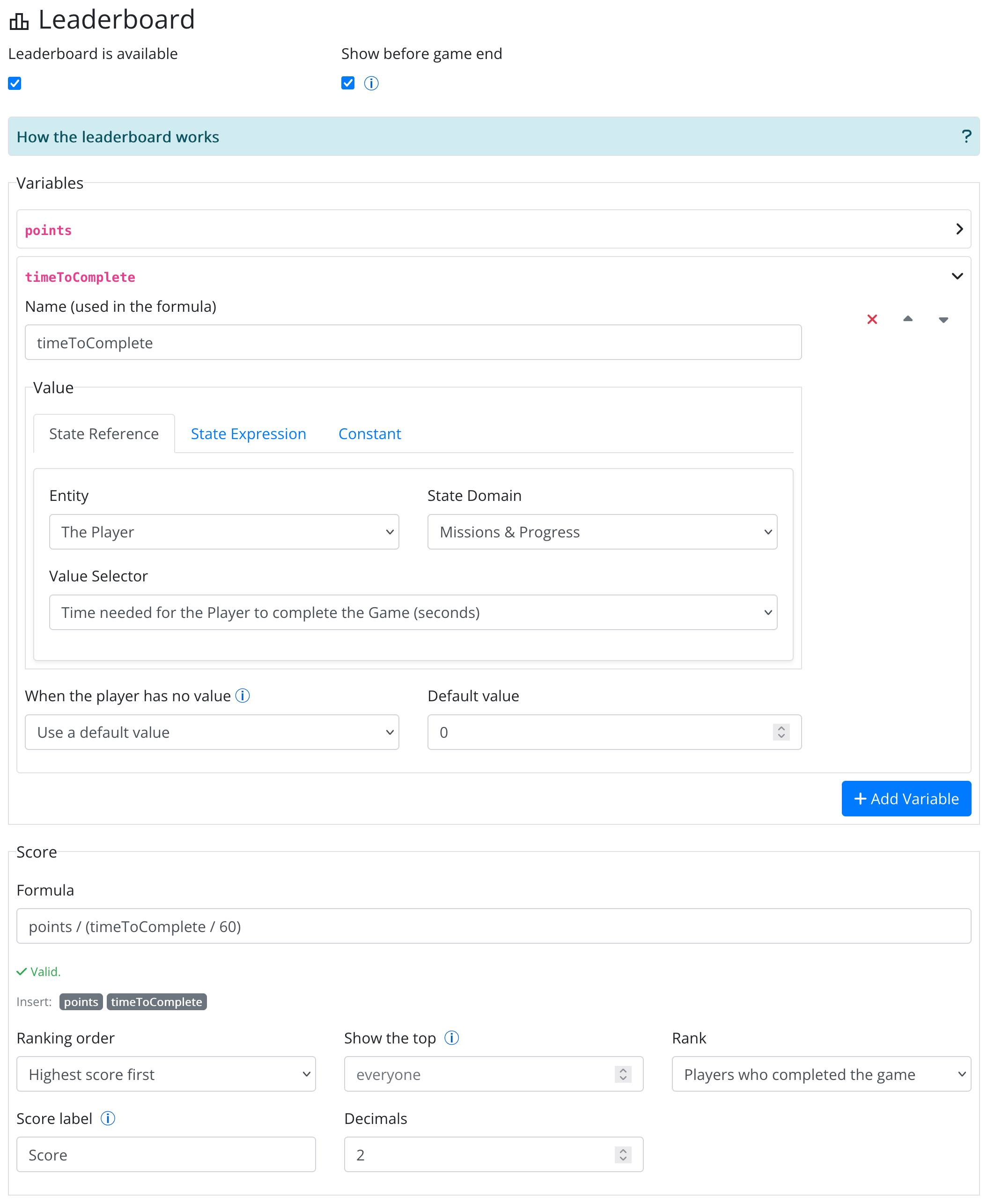
At the top of the editor:
- Leaderboard is available turns the leaderboard on for your players.
- Show before game end lets players open the leaderboard while the game is still running. Without it, players can see the leaderboard only once their game is over.
If the leaderboard is available but its formula is not valid (e.g. it uses a variable you have not defined), players get no leaderboard at all. You can save an unfinished definition while you work on it; the editor shows what is wrong.
Variables
A variable has a name and a value. The name is what you type in the formula, so it must be a single word made of letters, digits and underscores,
starting with a letter (e.g. points, quiz_score, time2). It cannot be the name of a formula function (min, max, …), and each name must be unique.
The value is taken from the player's (or the world's) state, in one of three ways:
| Value type | What it gives |
|---|---|
| State Reference | A number read from the state, chosen from a list of value selectors (see below). |
| State Expression | A condition. It counts as 1 when true and 0 when false, e.g. "completed the bonus mission". Useful for bonuses. |
| Constant | A fixed number, handy for weights you want to tune in one place. |
State references offer only selectors that return a number or a duration, for example:
- Player's Cash; Quantity of Item [Item] owned by the Player
- Time needed for the Player to complete the Game (seconds); … to complete Quiz [Quiz], … to answer Question [Question], … to complete Conversation [Conversation]
- Number of Questions the Player passed (or failed) in Quiz [Quiz]
- Number of times the Player completed Mission [Mission]; Current streak and Best streak of completed rounds of a repeating mission
- Number of owned objects of type [Object Type]; Number of distinct Objects of type [Object Type] the Player created / picked / dropped / destroyed
- Number of Offers of type [Offer] the Player owns / picked / redeemed
- Progress of Physical Task [Task] (meters or seconds); Time needed for the Player to complete External Task [Task] (seconds)
- Distance (meters) or time (seconds) the Player has [walked / run / walked or run / biked] since the game started, when the game uses the Activity Meter
- World values: Quantity of Item [Item] in the World, Count of World Objects of type [Object Type] in Scene [Scene], Count of World Offers of type [Offer]
When the Player Has No Value
A variable may have no value for some players, e.g. a player who never answered the question it reads. For each variable, choose what happens then:
- Leave the player out of the leaderboard (the default), or
- Use a default value that you enter.
The Score
| Field | What it does |
|---|---|
| Formula | The score. Use the variable names, numbers, + - * / %, brackets and the functions min(), max(), abs(), round(), floor(), ceil(). Click a variable chip below the field to insert its name. The editor checks the formula as you type and lists the variables it does not use. |
| Ranking order | Highest score first or Lowest score first (e.g. when the score is a time). |
| Show the top | How many players the leaderboard lists. Leave it empty to list everyone. |
| Rank | Players who completed the game (the default) or Every player still in the game. |
| Score label | Shown next to the score in the player app, e.g. "points". |
| Decimals | How many decimals the score is shown with (0 to 4). |
Some formula ideas:
| Goal | Variables | Formula | Order |
|---|---|---|---|
| Most cash wins | cash = Player's Cash | cash | Highest first |
| Fastest to finish wins | duration = Time needed to complete the Game | duration / 60 (minutes) | Lowest first |
| Points, with a penalty for slow players | points, duration | points * 100 - duration / 60 | Highest first |
| Quiz score plus a bonus for a secret mission | passed = Questions passed in Quiz X, bonus = State Expression "has completed mission Secret" | passed * 10 + bonus * 25 | Highest first |
| Most kilometres walked, run or biked | foot = Distance walked or run, bike = Distance biked (Activity Meter, since the game started) | (foot + bike) / 1000 | Highest first |
Ties and Exclusions
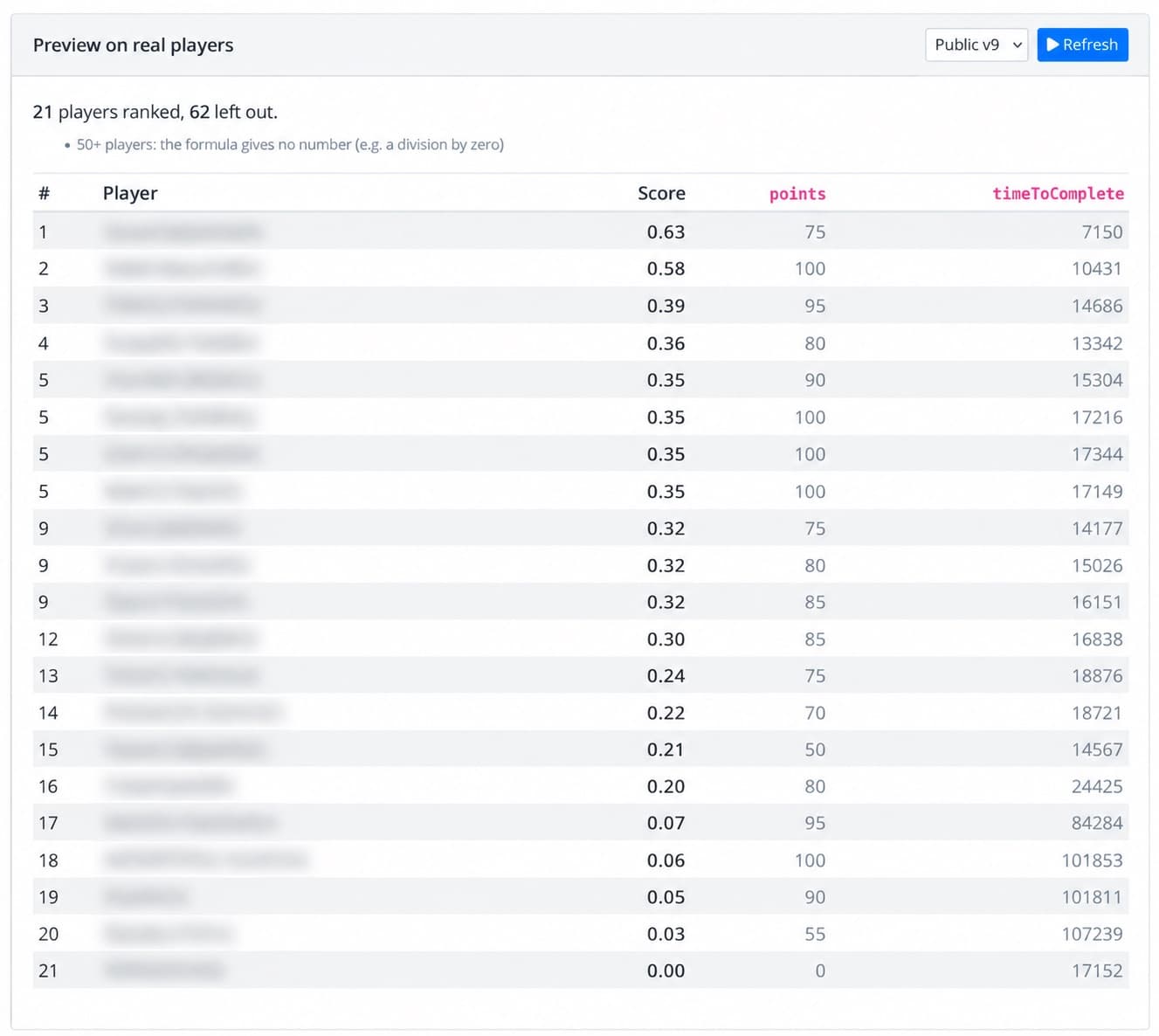
Players with the same score (as shown, i.e. rounded to the chosen decimals) share a rank (1, 2, 2, 4), and the player who completed the game earlier is listed first. When you show the top N, everyone tied at the cut-off is included.
Players who left the game are never ranked. A player is also left out when:
- a variable has no value for them and that variable leaves such players out, or
- the formula gives no number for them (e.g. a division by zero).
Previewing on Real Players
Under the editor, Preview on real players ranks the players of a published version by the definition as it is now, even before you save it. Pick a version and click Run preview to see the ranked table with each variable's value and the players who were left out, with the reason. This is the easiest way to check a formula. The preview lists up to 50 players; the Game Master Console shows the whole leaderboard.
Versions
Each published version keeps the leaderboard definition it was published with. So changes in the editor apply to the working version and to versions you publish from now on; they never re-score a version that is already public.
What the Players See
When the leaderboard is available, players find it under Player Rankings in the game menu: once their game is over (completed) or, if you enabled Show before game end, at any time while they play. While the game's playing period is still running the screen is titled Current Player Rankings; after it ends, Final Player Rankings.
The screen lists the ranked players with their avatar name, rank and score (with your score label), and highlights the player's own row. If the player is not in the top N, the screen says how many players are ranked and shows the player's own rank and score below the list, under You.
/images/rollick-app-rankings.png