Escape the Park
Introduction
This tutorial aims to introduce the process of creating pervasive games using the Rollick Games platform. The following sections describe the scenario and detailed plot of a small pervasive game. In each section, the “Implementation” table explains the steps required to implement the game on the Rollick platform.
You can download the required sprites (2d images) with Right Click > Save Image As.
Instructions
Game creation takes place on the Rollick platform (https://rollick.tuc.gr (opens in a new tab)), where you must create an account or use a social account such as Google or Facebook.
To gain the right to create games, a user must upgrade their Rollick account. This is done upon request.
You can monitor implementation progress through the Rollick App, available on Google Play Store and Apple App Store. Basic requirement: you must log in to both the platform and the app using the same user account.
Each time you extend or modify the game scenario, you must exit the game and re-enter it. In some cases, you may need to abandon the game and start again from the beginning.
During development, it is recommended to enable the “Simulate Player Move on the Map” option from the game settings (Settings/Playground), allowing you to move as a player by dragging the map instead of moving physically.
Game Description
A simple visit to the “Park of Peace and Friendship of the People” turns into a trap!
To escape, you will have to be smart and overcome the challenges posed by various strange characters who frequent the park. Follow the clues and unlock the gate to freedom!
Can you answer the wise professor 👩🌾? Will you trust the black cat 🐈⬛? Or will the playful squirrel 🐿️ trick you?
Can you escape the park?
Logo:
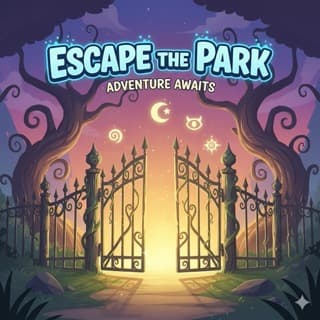
| Implementation (Create new Game) |
|---|
General Settings (General):
|
| Set a Game Logo: - Settings/General Logo: select and upload image logo.jpeg - Save |
Game Characters
| Name/Implementation | Avatar |
|---|---|
Groundskeeper: Design/Characters (NPC)/New
| 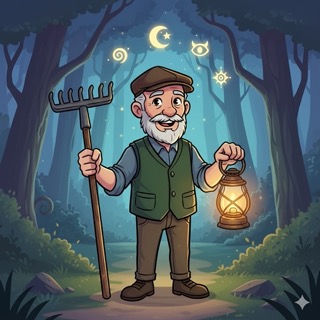 |
Professor: Design/Characters (NPC)/New
| 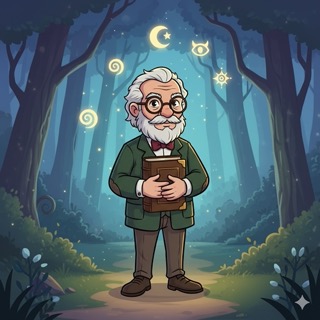 |
Black Cat: Design/Characters (NPC)/New
| 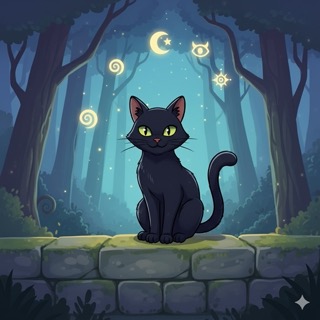 |
Squirrel: Design/Characters (NPC)/New
|  |
Spirit of the Park: Design/Characters (NPC)/New
| 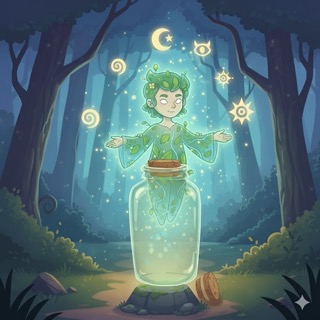 |
How to play
Players need to install the Rollick application, select the game "Escape the Park" where they will create their profile.
Where to play
Park of Peace and Friendship, Chania, Greece (opens in a new tab)
Plot
As the player enters the park, they are welcomed and asked to find the caretaker who is resting in the refreshment stand. The caretaker explains to the visitor that they have been locked inside the park, and that if they want to leave, they must discover the gate's code (PIN), the digits of which are held by the park's various "residents," and to get them, they must pass certain challenges. Then, the visitor must wander through the park, find the residents, and solve their riddles for them to give the 4 digits, and upon returning, unlock the gate.
Scenes
Only one scene: Park of Peace and Friendship, at 35.51135115309231, 24.025735676288605
Implementation
Create a new scene (Design/Game Plot/Scenes/New)
- Title: Park of Peace and Friendship
- System Title: Park
- Coords: 35.51135115309231, 24.025735676288605
- Radius: 100m
- Initially enabled: ✅
- Save
Scene Script
1. Visitor enters scene “Park of Peace and Friendship”
Spirit of the Park:
Welcome to our mysterious park! 🌿
I hope you find it interesting and have a nice time. For any assistance, look for the park groundskeeper. When he's not working, he often hangs out at the refreshment stand... 🍜🌮🍲
Visitor: OK
Implementation
-
Create the message “Welcome to the Park” (Design/Game Elements/Info Boxes/New)
- Title: Welcome to the Park
- Message: (see above)
- Typewriting: ✅
- Save
-
Create a rule in the script of the scene "Park of Peace and Friendship" to show the welcome message (Design/Game Plot/Scenes/Park of peace.../Scene Script/New Rule)
-
System Name: SHOW WELCOME
-
When:
- Player [VERB] scene [SCENE]: [Player enters scene Park]
-
Fire once: ✅
-
Do the Following:
- Spirit of the Park shows info Welcome to the Park
-
Save
🧭 At this point, if someone plays the game from the application, the following will happen: Upon the player entering the boundaries of the scene "Park of Peace and Friendship" their mobile phone will ring, and the Spirit of the Park will appear to welcome them. If they exit the scene and re-enter, nothing will happen.... (fire only once)
-
2. Visitor approaches the Bar (15μ)
Groundskeeper:
Welcome to the Peace and Friendship Park of the People! If you need anything, just let me know...
Oh, and one more thing: Keep in mind that the "Spirit of the Park" doesn't like goodbyes.
Visitor: What do you mean "it doesn't like goodbyes"?
Groundskeeper:
The Spirit always wants to see people in the Park. So, years ago, it enchanted the main gate to lock automatically behind every visitor. Well, guess what:
The gate behind you has locked! To escape this place, you will need the four secret digits of the Gate's code.
Visitor: How do I get them?
Groundskeeper:
First of all, you should know that we have many residents in the park who would love your company... but if freedom is what you are looking for, you have to meet some of the strange inhabitants of this park. Each one will give you a digit when you pass their challenges.
Collect all four digits to form the code when you return to the gate. Your adventure starts now!
Good luck, Visitor!
Visitor: Ok, see you...
Groundskeeper:
Heeeeey!!! Where are you going????
Am I not a resident of the park? If you want the first digit, you must answer a question of mine correctly.
**Visitor:**Nice, go on...
(A) Groundskeeper:
Water covers approximately 70% of the Earth's surface. True or False?
Visitor: True/False
Groundskeeper (correct):
(completes the dialogue, shows the 1st digit)
Ha! Correct!
Here is your first digit: 7 Keep it safe!
But one digit doesn't open the gate. You'll need 3 more!!!
For the next one, look for the Old Professor. He's resting on the bench just above here, always with a book in his hand, of course...
Don't be fooled by his serious face - he enjoys a good challenge.
(Note: The visitor should be able to see this message again if they wish to remember the code)
Groundskeeper (wrong):
Mmmmmm.... Try again
Visitor:
OK (Goes to A)
Implementation
- Create the conversation “Dialogue with Groundskeeper” (Design/Game Elements/Conversations/New)
- Add Statement (for each of the above phrases)
- Message: (the corresponding phrase)
- Typewriting: ✅
- DO NOT SAVE
- Add Statement (for each of the above phrases)
🧭 At this point the conversation should contain 6 statements:
- Statement 1: Welcome....
- Statement 2: The spirit wants always....
- Statement 3: First of all, ...
- Statement 4: Heeeey!!!....
- Statement 5: Water covers....
- Statement 6: Hmmmmm....
But these phrases are disconnected and the dialogue is incomplete. So we need to connect them to make a conversation...
- Create the player options and connect the conversation
- **Statement 1 / Add Option:
- Option Label: What do you mean “it doesn’t like goodbyes”?
- Option Actions:
- Groundskeeper says statement Statement 2
- **Statement 2 / Add Option:
- Option Label: How do I get them?
- Option Actions:
- Groundskeeper says statement Statement 3
- Groundskeeper says statement Statement 3
- Statement 3 /Add Option:
- Option Label: OK. See you...
- Option Actions:
- Groundskeeper says statement Statement 4
- Statement 4 / Add Option:
- Option Label: Nice, go on...
- Option Actions:
- Groundskeeper says statement Statement 5
- **Statement 5 / Add Option:
- Option Label: True
- Option Actions:
- Groundskeeper completes conversation
- Statement 5 / Add a Second Option:
- Option Label: False
- Option Actions:
- Groundskeeper says statement Statement 6
- Statement 6 / Add Option
- Option Label: OK
- Option Actions:
- Groundskeeper says statement Statement 5
- **Statement 1 / Add Option:
🧭 This dialogue should take place in front of the Jar Cafe. Therefore, the dialogue should be triggered when the player approaches a specific location.
-
Create location “Jar Cafe” (Design/Scenes/Park of peace..../Scene Places/New Place)
- Title: Jar Cafe
- Coordinates: 35.51171631242532, 24.025863751769066
- Radius: 15
- Trackable: ✅
- Perceived only If:
- Player [VERB] to Character [Character]: [Player has not talked to character Groundskeeper]
- Save
-
Create a script rule to start the conversation (Design/Game Plot/Scenes/Park of Peace.../Scene Script/New)
- System Name: TALK WITH GROUNDKEEPER
- When: Player [VERB] place [PLACE]: [Player has approached place Jar Cafe]
- Fire once: ✅
- Do the Following:
- Groundskeeper starts conversation Dialogue with Groundskeeper
- Save
🧭 The conversation ends when the player correctly answers the Groundskeeper's question. Then, the Groundskeeper must give them the 1st digit for the code. This will be done with a separate message (InfoBox) so that players can see it in the instructions later...
-
Create message “First Digit” (Design/Game Elements/Info Boxes/New)
- Title: First Digit
- Message: (see above)
- Typewriting: ✅
- Show in directions with title: ✅**:** The first digit
- Save
-
Create a rule in the scenario of the scene "Park of Peace and Friendship" to give the first digit (Design/Game Plot/Scenes/Park of Peace.../Scene Script/New Rule)
- System Name: SHOW FIRST DIGIT
- When: Player [VERB] conversation [CONVERSATION]: [Player has completed conversation Dialogue with Groundskeeper]
- Fire once: ✅
- Do the Following:
- Groundskeeper shows info First Digit
- Save
🧭 At this point, the player gets the 1st digit and has also received instructions that for the 2nd one, they must find the professor who is sitting on the bench. So, it is clear what they need to do...
3. The visitor scans the QR code on the bench near the steps of the open-air theater
Professor:
Ah, welcome visitor... The Groundskeeper sent you here, right?
Haha... then it means it's time to test your mind. I don't give away numbers easily!
Visitor: What do I have to do?
Professor:
I will give you a riddle. If you solve it, I will reveal the next digit of the secret code. Pay close attention!
Visitor: OK
Professor: (asks question Β)
What year did the people become friends; (Correct answer: 1987 - the date the park1 was handed over)
Visitor: Types the answer
Old Professor (wrong answer):
Wrong. Try again...
(and asks question (B) again)
Old Professor (correct answer): (shows the 2nd digit)
Well done, you're sharp! The year 1987.
Aaah... great times...
So, the second digit is 3. Make sure you remember it.
But you're not done yet. You have to find the black cat hiding in the bushes, watching the children play.... Will you trust it?
Visitor: Ok
Implementation
- Create the conversation “Dialog with Professor” (Design/Game Elements/Conversations/New)
- Add Statement * (one for each phrase of the professor)
- Message: (the corresponding phrase)
- Typewriting: ✅
- DO NOT SAVE
- Add Statement * (one for each phrase of the professor)
🧭 At this point, the conversation has 2 phrases
- Statement 1: Ah, welcome visitor...
- Statement 2: I will give you a riddle...
But these phrases are disjointed and the dialogue is incomplete. So we need to connect them to form a conversation...
- Create player options and connect the conversation
- Statement 1 / Add Option:
- Option Label: What do I have to do?
- Option Actions:
- Professor says statement Statement 2
- Statement 2 / ** Add Statement Option**
- Option Label: OK
- Option Actions:
- Rollick **completes conversation
- Save
- Statement 1 / Add Option:
🧭 This dialogue should take place on the bench on the park's main road. It will start when the player scans an appropriate QR code. We don't need to create the QR code separately; it is generated automatically by the system when defining the script rule...
- Create script rule to start the dialogue with the professor (Design/Game Plot/Scenes/Park of Peace.../Scene Script/New Rule)
- System Name: TALK WITH PROFESSOR
- When:
- Player [VERB] code [CODE]: [Player has read code ___ (leave empty)]
- Fire once: ✅
- Do the Following:
- Professor starts conversation Dialogue with Professor
- But only If:
- Player [VERB] info [INFO]: [Player has seen info First Digit]
- Save
🧭 When the above dialogue is complete, the Professor must pose his riddle to the player.
-
Create the Professor’s riddle (Design/Game Elements/Questions/New)
- System Title: Professor Riddle
- Title: So
- Question: (see above)
- Question type:Open ended
- Answer type: Number
- There is a correct answer: ✅
- Correct Answer: 1987
- Save
-
Create a script rule to show the Professor’s riddle (Design/Game Plot/Scenes/Park of Peace.../Scene Script/New Rule)
- System Name: ASK PROF RIDDLE
- When:
- Player [VERB] conversation [CONVERSATION]: [Player has completed conversation Dialogue with Professor]
- Fire once: ✅
- Do the Following:
- Professor asks question Professor Riddle
- Save
🧭 After the professor poses his riddle, the player can answer correctly or incorrectly. We must handle the player's answer appropriately and continue the plot. If he answers correctly, he must be given the 2nd digit; if not, he must be asked the question again (until he answers correctly).
-
Create InfoBox for the 2nd Digit (Design/Game Elements/Info Boxes/New)
- Title: Second Digit
- Message: (see above)
- Typewriting: ✅
- Show in directions with title✅: The second digit
- Save
-
Create a script rule to check the player’s response to the Professor’s riddle (Design/Game Plot/Scenes/Park of Peace.../Scene Script/New Rule)
- System Name: SHOW SECOND DIGIT
- When:
- Player [VERB] question [QUESTION]: [Player has completed question Professor Riddle]
- Fire once ✅
- Do the Following:
- Professor shows info Second Digit
- But only if:
- Player [VERB] question [QUESTION]: [Player has passed question Professor Riddle]
- Else do the following:
- Professor shows notification “Wrong. Try again...”
- Professor asks question Professor Riddle
- Save
🧭 At this point, the player has received the 2nd digit from the professor, and in fact, he was told that the 3rd one will be obtained from the cat that is in a bush and is watching the children play (i.e., a hit to the player to search for the Cat above the Park’s play area).
4. Visitor approaches the Black Cat (35.510861,24.025559)
Black Cat (asks Question C):
So you want to leave the park too, eh? I have no problem with it. I just want some peace and quiet... but first, I have to ask you something.
As you know, this park was inaugurated in 1987... the tree behind me was planted exactly then. 40 years have passed since then! Not even my grandmother was born...
The day before yesterday, someone told me that the park is the same age as half the tree's life.
How old is the tree, ultimately?
(Correct answer: 76)
Visitor: Types their answer
Black Cat (wrong answer):
How gullible you are? Read carefully again....
and asks the question again (C)
Black Cat (correct answer): (Shows the third digit2)
You struggled a bit, didn't you?
You did it though, well done! So, the third digit is 5.
You earned it!
Normally, I would give you the 4th digit too, but the park squirrel stole it from me. You have to find him to get it... Keep your eyes open!
Visitor: OK
Implementation
- Create the Riddle of the Black Cat
(Design/Game Elements/Questions/New)- System Title: The Riddle of the Cat
- Title: Meow....
- Question: (see above)
- Question type:Open ended
- Answer type: Number
- There is a correct answer: ✅
- Correct Answer: 76
- Save |
- Create the Info box for the Third Digit
(Design/Game Elements/Info Boxes/New)- Title: Third Digit
- Message: (see above)
- Typewriting: ✅
- Show in directions with title: ✅The third digit
- Save
🧭 This question should be posed to the player in front of the bush where the Black Cat is located. That is, when the player approaches a specific location.
- Create the Location where the Black Cat sits
(Design/Scenes/Park of Peace..../Scene Places/New)- Place Title: Cat Bush
- Coordinates: 35.51091830886208, 24.02555999159813
- Radius: 10
- **Trackable:**✅
- Visible: Never - Perceived only If:
Player [VERB] info [INFO]: [Player has seen info Second Digit] - Save |
- Create a script rule to ask the Black Cat’s riddle
(Design/Game Plot/Scenes/Park of Peace.../Scene Script/New Rule)- System Name: TALK WITH CAT
- When: Player [VERB] place [PLACE] Player has approached place Cat Bush
- Fire once ✅
- Do the Following:
- Black Cat asks question The Riddle of the Cat
- Save
🧭 Now we should similarly check the player's answer, and continue the plot.
- Create a script rule to check player’s response to the riddle of the black cat (Design/Game Plot/Scenes/Park of Peace.../Scene Script/New Rule)
- System Name: SHOW THIRD DIGIT
- When:
- Player [VERB] question [QUESTION]
- Player has completed question The Riddle of the Cat
- Player [VERB] question [QUESTION]
- Fire once ✅
- Do the Following:
- Black Cat shows info Third Digit
- But only if: Player [VERB] question [QUESTION]
[Player has passed question The Riddle of the Cat] - Else do the following:
- Black Cat shows notification “How gullible you are? Read carefully again....”
- Black Cat asks question The Riddle of the Cat
- Save
🧭 At this point, the player has also taken the 3rd digit from the cat, which told them that the 4th was taken by the Squirrel running around... and to keep their eyes open. The reason for the cat's last remark is that we want the squirrel to appear on the player's device map... The simplest way to do this is to create a new location in the shape of the squirrel, which, however, will become visible and detectable when the player has spoken with the cat and taken the third digit.
- Create the Location of the Squirrel
(Design/Scenes/Park of Peace..../Scene Places/New)- Place Title: Squirrel
- Map Icon: Squirrel.jpeg
- Icon Size: 40
- Coordinates: 35.51112736254604, 24.02626273036003
- Radius: 10
- **Trackable:**✅
- Visible: Always
- Tappable: Never
- Perceived only If:
- Player [VERB] info [INFO]: [Player has seen info Third Digit]
- AND
- Player [VERB] info [INFO]: [Player has not seen info Fourth Digit]3
- Save
🧭 At this point, the player has acquired the 3rd digit and the Squirrel is visible on their map. However, they will need to go closer in order to "talk" to him...
Implementation
-
Create the Riddle of the Black Cat (Design/Game Elements/Questions/New)
- System Title: The Riddle of the Cat
- Title: Meow....
- Question: (see above)
- Question type:Open ended
- Answer type: Number
- There is a correct answer: ✅
- Correct Answer: 76
- Save
-
Create the Info box for the Third Digit (Design/Game Elements/Info Boxes/New)
- Title: Third Digit
- Message: (see above)
- Typewriting: ✅
- Show in directions with title: ✅The third digit
- Save
🧭 This question should be posed to the player in front of the bush where the Black Cat is located. That is, when the player approaches a specific location.
-
Create the Location where the Black Cat sits (Design/Scenes/Park of Peace..../Scene Places/New)
- Place Title: Cat Bush
- Coordinates: 35.51091830886208, 24.02555999159813
- Radius: 10
- **Trackable:**✅
- Visible: Never
- Perceived only If:
- Player [VERB] info [INFO]: [Player has seen info Second Digit]
- Save
-
Create a script rule to ask the Black Cat’s riddle (Design/Game Plot/Scenes/Park of Peace.../Scene Script/New Rule)
- System Name: TALK WITH CAT
- When:
- Player [VERB] place [PLACE]: [Player has approached place Cat Bush]
- Fire once ✅
- Do the Following:
- Black Cat asks question The Riddle of the Cat
- Save
🧭 Now we should similarly check the player's answer, and continue the plot.
- Create a script rule to check player’s response to the riddle of the black cat (Design/Game Plot/Scenes/Park of Peace.../Scene Script/New Rule)
- System Name: SHOW THIRD DIGIT
- Fire once
- When:
- Player [VERB] question [QUESTION]: Player has completed question The Riddle of the Cat Fire once ✅
- Do the Following:
- Black Cat shows info Third Digit
- But only if:
- Player [VERB] question [QUESTION]: [Player has passed question The Riddle of the Cat]
- Else do the following:
- Black Cat shows notification “How gullible you are? Read carefully again....”
- Black Cat asks question The Riddle of the Cat
- Save
🧭 At this point, the player has also taken the 3rd digit from the cat, which told them that the 4th was taken by the Squirrel running around... and to keep their eyes open. The reason for the cat's last remark is that we want the squirrel to appear on the player's device map... The simplest way to do this is to create a new location in the shape of the squirrel, which, however, will become visible and detectable when the player has spoken with the cat and taken the third digit.
- Create the Location of the Squirrel (Design/Scenes/Park of Peace..../Scene Places/New)
- Place Title: Squirrel
- Map Icon: Squirrel.jpeg
- Icon Size: 40
- Coordinates: 35.51112736254604, 24.02626273036003
- Radius: 10
- **Trackable:**✅
- Visible: Always
- Tappable: Never
- Perceived only If:
- Player [VERB] info [INFO]: [Player has seen info Third Digit]
- AND
- Player [VERB] info [INFO]: [Player has not seen info Fourth Digit]3
- Save
🧭 At this point, the player has acquired the 3rd digit and the Squirrel is visible on their map. However, they will need to go closer in order to "talk" to him...
5. Visitor sees & approaches the Squirrel (35.511145,24.026280)
Squirrel (asks question D):
and another one who got locked inside the park...???
Don't worry, I'll help you get out.
Here is a very easy riddle for something I like very much:
If I bury it, it comes alive, if I dig it up, it dies. What is it?
(Correct answer: acorn)
Visitor: Types their answer
Squirrel (wrong answer):
Think better...
And asks again question D
Squirrel (correct answer): (shows Fourth Digit4)
So, there you go, you earned the 4th digit. It is 8.
So, there you go, you worthily found the 4th digit. It is 8.
Run to open the gate you came through.
Visitor: OK
Implementation
-
Create the Riddle of the Squirrel _(Design/Game Elements/Questions/New)
- System Title: Riddle of the Squirrel
- Title: Ooooh!
- Question: (see above)
- Question type:Open ended
- Answer type: Single line text
- There is a correct answer: ✅
- Correct Answer: Acorn
- Save
-
Create info box for the Fourth Digit _(Design/Game Elements/Info Boxes/New)
- Title: Fourth Digit
- Message: (see above)
- Typewriting: ✅
- Show in directions with title: ✅ The fourth digit
- Save
🧭This question should be asked to the player when the player approaches a specific location, that of the squirrel (which we have already created).
- Create a script rule to let the Squirrel ask his Riddle_ (Design/Game Plot/Scenes/Park of Peace.../Scene Script/New Rule)
- System Name: TALK WITH SQUIREL
- When:
- Player [VERB] place [PLACE]: [Player has approached place Squirrel]
- **Fire once: ✅
- Do the Following:
- Squirrel asks question The Riddle of the Squirrel
- Save
🧭Now we should correspondingly check the player's answer, and continue the plot.
- Create a script rule to check the players response to the Squirrel’s Riddle (Design/Game Plot/Scenes/Park of Peace.../Scene Script/New Rule)
- System Name: SHOW FOURTH DIGIT
- When:
- Player [VERB] question [QUESTION]: [Player has completed question The Riddle of the Squirrel]
- Fire once: ✅
- Do the Following:
- Squirrel shows info Fourth Digit
- But only if:
- Player [VERB] question [QUESTION]: [Player has passed question The Riddle of the Squirrel]
- Else do the following:
- Squirrel shows notification “Think better...”
- Squirrel asks question The Riddle of the Squirrel
- Save
🧭At this point, the player has also acquired the 4th digit and can unlock the gate and leave the park....
6. Vistor returns to the Gate (35.5120821,24.0252233)
The Spirit of the Park (shows an apologizing message):
What a pity... You want to leave, apparently, don't you?
Look, I lock the door not out of malice, but out of fear of loneliness. I simply want the park to be full of people, voices, joys, and laughter! You honored the park and wandered through many of its corners. I have no complaints.
Now the door will obey you... but to open, you must enter the code.
If you leave, remember the park. And if you stay... you will never be alone.
Visitor: OK
Implementation
- Create Info Box for the Apologizing message (Design/Game Elements/Info Boxes/New)
- System Title: Spirit Apology
- Title: What a pity...
- Message: (see above - without “What a pity...”)
- Show with Typing Effect: ✅
- Save
🧭This message should appear to the player when they approach the gate (towards Dimokratias street). Therefore, a new location is needed...
-
Create the Location for the Gate of the Park (Design/Scenes/Park of Peace..../Scene Places/New Place)
- Title: Gate
- Coordinates: 35.51209347824397, 24.025824189186096
- Radius: 10
- **Trackable:**✅
- Visible: Never
- **Perceived only If:
- Player [VERB] info [INFO]: [Player has seen info Fourth Digit]
- Save
-
Create a script rule to let the Spirit of the Park talk to the player (Design/Game Plot/Scenes/Park of Peace.../Scene Script/New Rule)
- System Name: TALK WITH SPIRIT
- When:
- Player [VERB] place [PLACE]: [Player has approached place Gate]
- Fire once: ✅
- Do the Following: 1. The Spirit of the Park shows info Spirit Apology Save
🧭Now the player can unlock the gate by entering the code. (use “Type Code” menu option)
7. Visitor types the code 7358 to unlock the Gate
The Spirit of the Park (shows a farewell message and completes the game):

The gate opened... and with it, the road opens for you. I know your heart is leading you outside my boundaries, and I can no longer hold you.
But heed one last plea: Never forget the park. Come back again and again. Walk the paths, listen to the birds, play with the little turtles... and let's keep in touch...
Farewell friend... (I hope I can consider you my friend)
Visitor: OK
Implementation
- Create the farewell message (Design/Game Elements/Info Boxes/New)
- System Title: Farewell from the Spirit
- Title: See you again...
- Message: (see above)
- Media:TheGate.jpeg
- Show with Typing Effect: ✅
- Save
🧭This message must be displayed to the player when they enter the code formed by the four digits they found: 7358
- Create a script rule to “unlock” the Gate and complete the Game. (Design/Game Plot/Scenes/Park of Peace.../Scene Script/New Rule)
- System Name: COMPLETE GAME
- When:
- Player [VERB] coad [CODE]: [Player has read code 7358]
- Fire once: ✅
- Do the Following:
- The Spirit of the Park shows info Farewell from the Spirit
- Rollick **completes the game
- Save
 GAME Completed
Footnotes
-
The park is dedicated to the Peace and Friendship of the People ↩
-
This message should be accessible to the visitor again if they wish to recall the code ↩
-
While the first condition ensures that the squirrel will be visible and detectable after the player gets the 2nd digit, this second condition ensures that as soon as the player gets the 4th digit, the Squirrel hides again... ↩ ↩2
-
This message should be accessible again to the visitor if they wish to recall the code ↩