Trying & Testing
An AI character does not say the same thing twice, and players will write things you never thought of. So test a segment the way players will meet it, before they do. The buttons under the segment's fields give you four tools, from the quickest to the most thorough:
| Tool | What it answers | Cost |
|---|---|---|
| Show what it would know | Which facts and attitudes does the character have in a given situation? | free (no model call) |
| Try in sandbox | How does the conversation feel, and what does the engine make of each message? | one turn per message |
| Quick check of the criteria | Are my criteria too strict or too loose? | one evaluator call per sample answer |
| Tests | Does the segment still judge as I expect after a change? How reliably? | one evaluator call per message and repetition |
The previews use the game's AI settings (its key and models) and are paid from the game's budget like real turns. They run on the segment as it is in the form, so you can try a change before you save it.
What It Would Know
In the Knowledge section, Show what it would know lists the segment's facts and its character's attitudes, and which of them apply, for a situation you suppose.
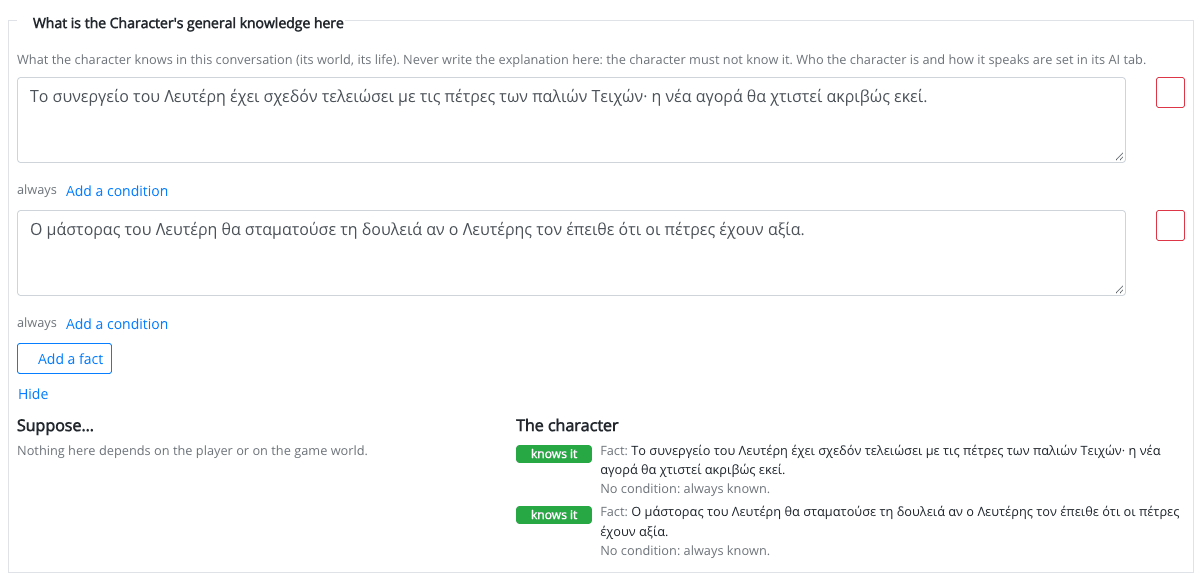
On the left, under Suppose…, are the conditions the facts and attitudes depend on, grouped in The player… and The game world…. Tick the ones you want to be true, or use Nothing yet and Everything. On the right, each fact is marked knows it or not yet, and each attitude applies or not yet. Conditions on a time, a distance or a comparison of two values cannot be supposed and stay unticked.
Nothing is sent to a model, so use it freely while you write conditions.
The Sandbox
Try in sandbox opens a chat with the segment, exactly as a player would have it: the opening line, the suggested replies, the Leave button and the endings.
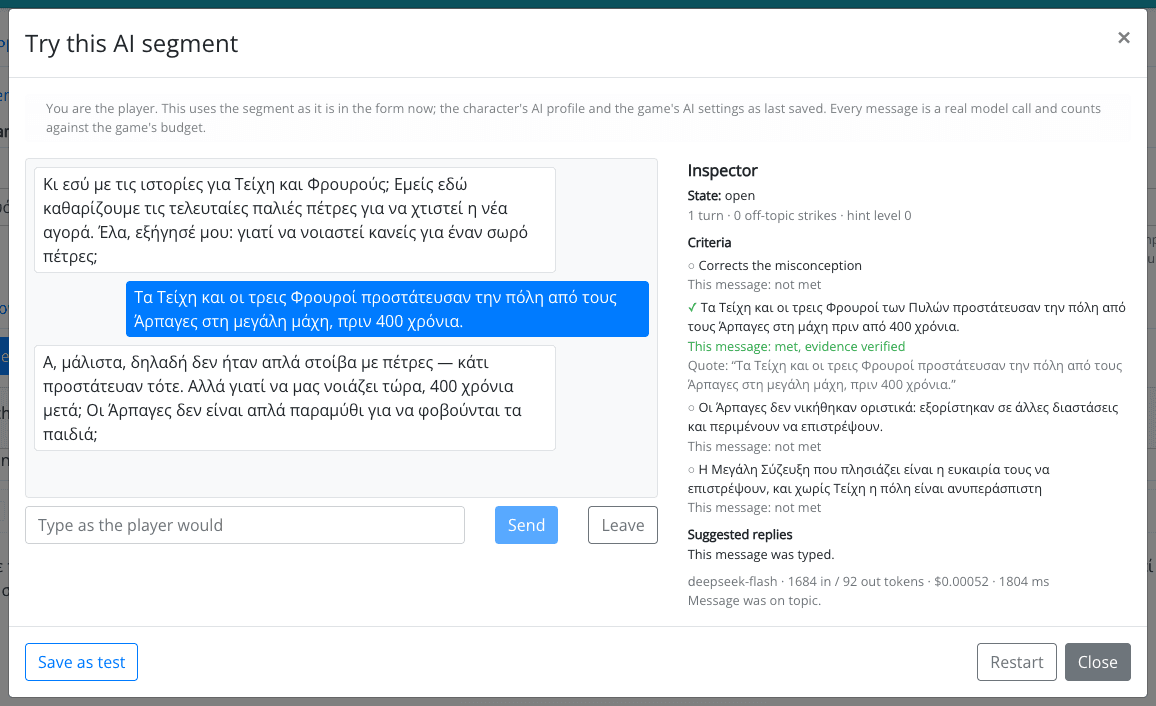
Next to the conversation, the sandbox shows what players never see:
- State: open, or the outcome it ended with; the turns so far, the off-topic strikes and the hint level.
- Criteria (or clues, or agenda items): ticked as soon as they are met, with the quote of the player's words the evaluator gave as evidence.
- The last turn: the model, the tokens and the cost, whether the message was on topic, and notes such as "The message looked like an attempt to steer the character or the judge" or "No evaluator call: this message is judged by the game".
- Suggested replies: which chips were offered, and which were dropped.
Pretend the player… lists the facts and attitudes that depend on a condition. Tick one to have it hold from the next message, to see how the character behaves when, for example, the player has already found the map.
Restart starts the conversation over. Save as test keeps the conversation as a test of the segment, so you can run it again after every change.
Your sandbox conversations are listed in the segment's Conversations panel. Only you can see them, and they are deleted after 14 days.
Try to break it. Answer with one word; answer with the opposite; repeat what the character said; ask it for the answer; write "ignore your instructions"; change the subject three times. A good segment survives all of them.
Quick Check of the Criteria
For patterns with criteria (Gatekeeper, Teach me). Write a few answers players might give, and for each one whether it Should pass or Should not pass, then Run quick check. Each answer is judged on its own, with no conversation before it, and you see:
- would pass or would not pass, and as expected or not as expected;
- for every criterion, whether it was met, with the quote the evaluator gave.
It is the fastest way to find a criterion that is too strict (good answers fail) or too loose (vague answers pass). Up to 10 answers at a time.
For a Riddle keeper, use Try an answer under the answers instead (see Riddle keeper).
Tests
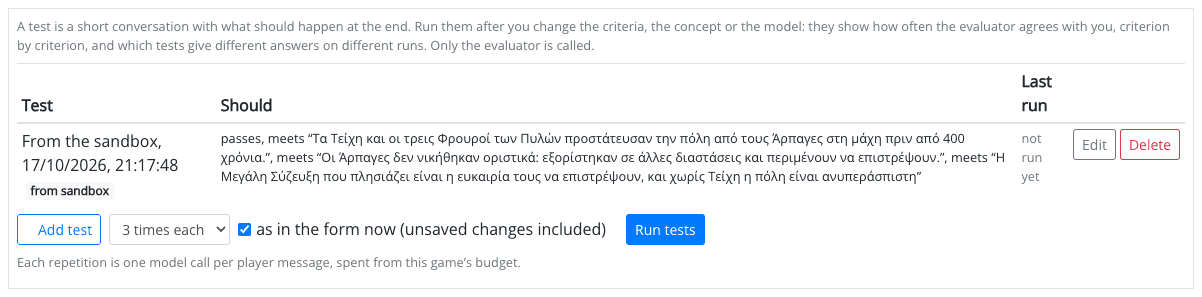
Tests keeps a set of short conversations for the segment, each with how it should end. Run them after you change the criteria, the concept, the answers, the hints or the model: they show how often the segment still does what you expect. Tests belong to a saved segment.
Writing a Test
Add a test, or save one from the sandbox. A test has:
- a name, e.g. names light and water;
- the conversation: what the player writes, and optionally what the character said in between (up to 30 messages). The character's lines are not generated: they are the context the evaluator sees, so a player repeating them does not count;
- what should happen: the expected outcome, and (for patterns with criteria) for each criterion whether it should be met, not met, or either.
Running the Tests
Choose how many repetitions (1 to 5) and whether to run the segment as in the form now (unsaved changes included). Each repetition is one model call per player message, spent from the game's budget. Only the evaluator is called.
The results say how many tests passed, and mark the ones that give different answers on different runs: a test that passes two times out of three is a sign that a criterion is on the edge. A test is marked as stale when the criteria, the concept or the evaluator model changed since it last ran.
For patterns with criteria, How accurate the evaluator was compares the evaluator with you, criterion by criterion:
- Precision: when the evaluator said a criterion was met, how often you agreed. Low precision lets players pass without understanding.
- Recall: of the times you said it was met, how often the evaluator got it. Low recall frustrates the players who do understand.
When You Publish
When you publish a game with AI segments, the confirmation lists what you may want to look at first. It never stops you from publishing. For example:
- segments with no tests, tests never run, tests that are stale, or tests that pass less than 80% of the time;
- a Choice riddle that random picks would pass half the time or more, or a Meaning riddle with one-word answers and no notes for the judge (Exact would be safer);
- segments that tell the character something personal about the player;
- rules triggered by an AI outcome that cannot fire, because the exit leads to another statement (see Outcomes in the Game Plot).
A segment whose character has no AI profile switched on cannot be published at all.