AI Segments
An AI segment is a part of a chat conversation where an AI character talks freely with the player. In the conversation it takes the place of a statement: other statements can lead to it, and its exits lead on, like the options of a statement. So a conversation can mix written lines and free talk, e.g. a written introduction, then an AI segment, then a written reward scene.
Adding an AI Segment
AI segments can be added only to conversations whose Display is Chat.
- In the Flow tab, use the AI segment button of the toolbar, or
- in the List tab, use New AI segment next to the button that adds a statement,
and choose its pattern. The new segment appears with a robot icon and with the exits of its pattern already in place. Wire it in as you would a statement: make an option of an earlier statement say it, or start the conversation with it.
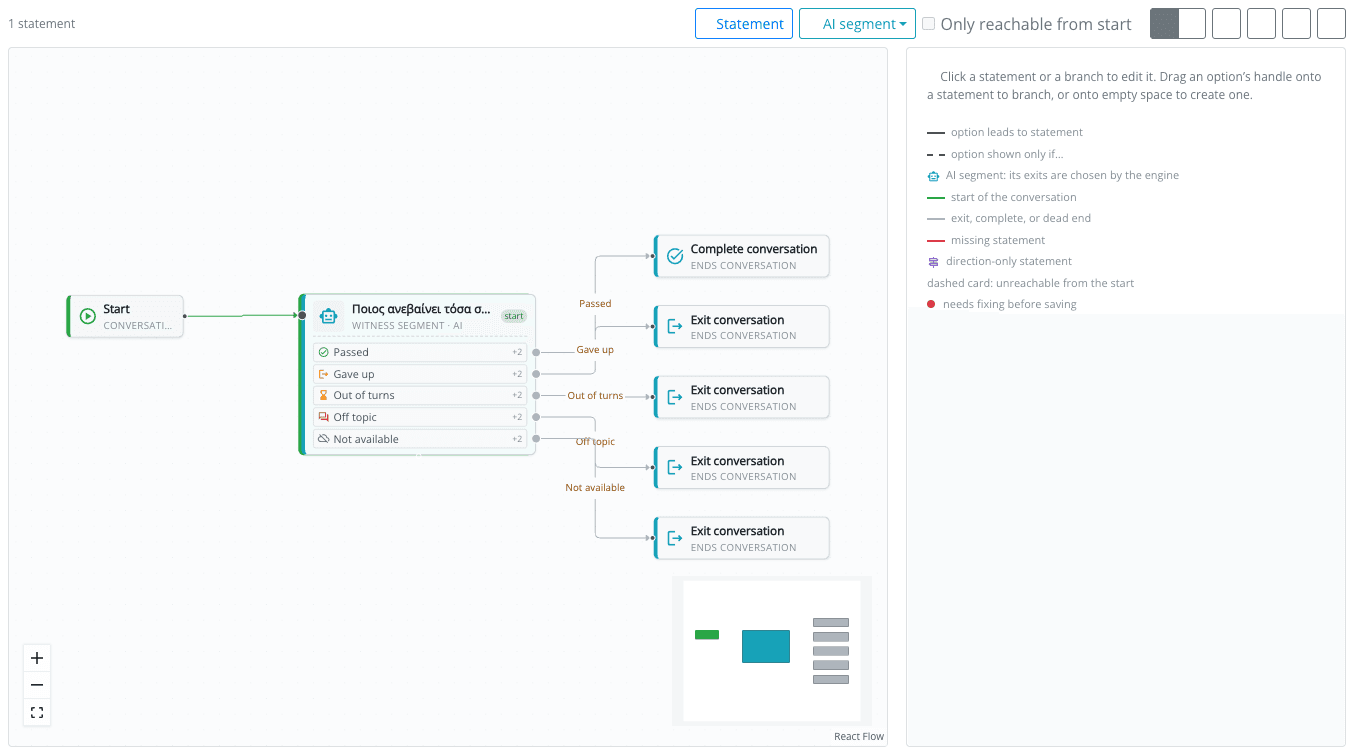
Click the segment in the Flow tab (or open it in the List tab) to edit it. The rest of this page goes through its fields from top to bottom.
The fields change with the pattern: a Riddle keeper has answers and hints, a Witness has clues, a Presenter has an agenda. Those are described in Conversation Patterns. This page covers what every AI segment has.
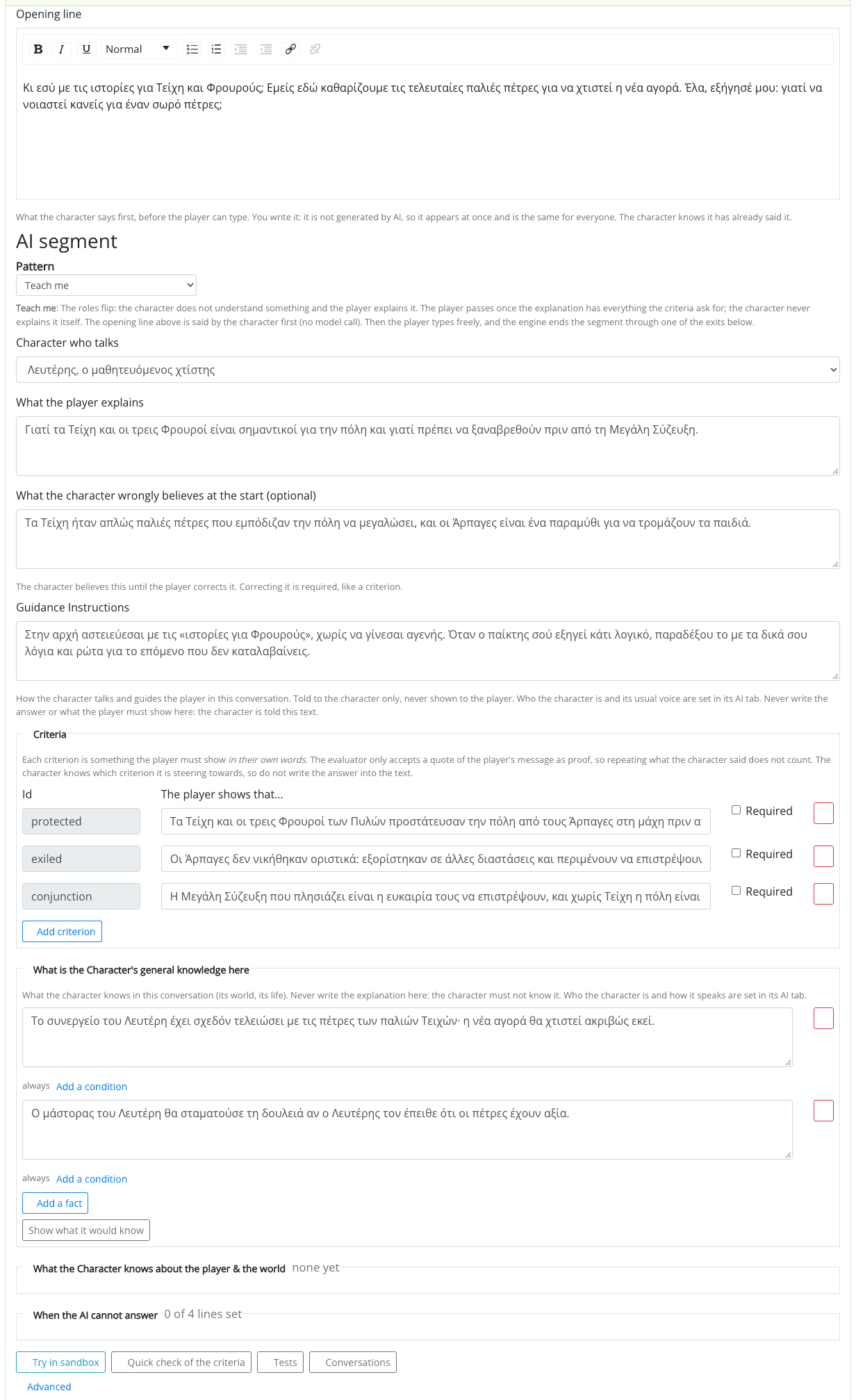
Opening Line
The statement's message becomes the opening line: what the character says first, before the player can type. You write it; it is not generated, so it appears at once and is the same for everyone. The character knows it has already said it, so make it a real start of the conversation, e.g. "Halt! Nobody climbs to the lamp unless they know why it matters. So tell me, traveller: why does this tower need a light?"
For a Riddle keeper the opening line is the riddle.
Pattern and Character
| Field | What it does |
|---|---|
| Pattern | The kind of conversation. You can change it later, but its exits change with it: you are shown which exits are removed (and what they led to), which are added, and what you will need to fill in, before you confirm. |
| Character who talks | One of the characters whose AI profile is switched on. A segment whose character has its profile switched off cannot be published. |
What the Player Must Do
The patterns that judge the player have a Concept and Criteria:
- Concept: what the conversation is about, e.g. photosynthesis or why ships need the lighthouse.
- Criteria: each criterion is something the player must show in their own words, e.g. the player shows that plants need light to make their food. Mark it Required, or leave it optional. The evaluator only accepts a quote of the player's message as proof, so repeating what the character said does not count.
Write criteria as observable statements, one idea each. "Names light as what the plant needs" is easier to judge, and to judge the same way twice, than "understands photosynthesis". Use the quick check to see how strict a criterion is.
The character knows which criterion it is steering towards, but it is never told an answer you did not write down. Do not write the answer into the Guidance or the Knowledge: the character is told those, and may say them.
Guidance Instructions
How the character talks and guides the player in this conversation, e.g. "Speak warmly and slowly. Lead the player to the old well first, then to the chapel; give directions as riddles, never as a map." It is told to the character only, never shown to the player (at most 1000 characters). Who the character is and its usual voice are set in its AI profile.
What Is the Character's General Knowledge Here
The facts the character knows in this conversation. A character has no knowledge of its own: what it knows belongs to each conversation. So the same librarian can know about the school's history in one conversation, and about the missing book in another.
Add a fact, one or two sentences each, e.g. "The mill was built in 1820 by the Kostas family."
A fact can be known always, or only when a condition holds on the player or the game world. Use Add a condition under the fact, and build it with the condition builder: blocks are alternatives, the conditions in a block must all hold. For example, the character learns that "the key is under the third stone" only once the player has found the map. The condition is checked again on every message, so a fact becomes known in the middle of a conversation as soon as it holds. A condition that is unfinished, or points at something that was deleted, makes the fact unknown.
Show what it would know opens a preview of which facts and attitudes apply in a given situation.
In the Guide and Presenter patterns, the knowledge is what the character talks about; it says it does not know anything else.
What the Character Knows about the Player & the World
Optional. Things about the player and the world that the character may refer to, always told to it as a sentence with names. Each one is either:
- something the player did, a condition built with the condition builder, told while it is true, e.g. has completed the mission "Light"; or
- a value, a count, an amount, a time or a short text picked with the state value picker, told with its value while the player has one, e.g. number of times the player completed the mission "Light".
The character can then say "You fixed the lamp already, didn't you?". The evaluator never sees these facts, so they never help a player pass.
What the character is told is sent to the AI provider with the conversation. List only what the character needs. If a value is personal (e.g. the player's name or where they are), the Studio warns you: players may be children, so use it only if you have the right to, and say so in the game's policies.
When the AI Cannot Answer
Lines the character says in this conversation without any model: when the player keeps leaving the subject, when a reply had to be withheld, when there is no network, no key or AI is paused, and when the player passed but the character's own closing line doubted it. Leave a line empty to use the character's default response, shown greyed in the field.
Exits
The exits are how the segment ends. The engine fires them; the player never picks one. Each exit is an option of the statement, so you give it actions as usual. Its main action must be NPC says statement (the conversation goes on), exit conversation or complete conversation.
| Exit | When the engine takes it |
|---|---|
| Passed | The player showed what was asked (or, in a Guide or Presenter, the conversation came to its end). Usually leads to the reward. |
| Passed with help | The player got there after hints, or with a suggested reply. Optional: without it, this outcome takes the Passed exit. |
| Gave up | The player chose to leave. Optional: without it, leaving takes the Not available exit. |
| Out of turns | The turn limit of the segment, or a spending limit of the game, ran out. (A Riddle keeper calls it Out of guesses.) |
| Off topic | The player kept leaving the subject (three times, by default). |
| Not available | The AI could not answer: no network, no key, AI paused. Older versions of the player app show this exit as a normal choice, so give it a label. |
Out of turns, Off topic and Not available are mandatory in every pattern, so a segment can never get stuck. Some patterns make others mandatory too (e.g. a Guide always ends with Passed). The optional ones are added with the + exit buttons under the exits.
In the Flow tab the exits are drawn in their own colours, so you can see at a glance which outcome leads where.
Exits are not the only way to react to an outcome. You can also use the outcome, and what the player achieved, in conditions and in script rules anywhere in the game. See Outcomes in the Game Plot.
Advanced
Under Advanced:
| Setting | What it does |
|---|---|
| Most turns | How many messages the player may send before the segment ends through Out of turns. The default depends on the pattern (e.g. 12 for a Gatekeeper, 20 for a Guide, the agenda items + 2 for a Presenter). |
| Hint after this many stuck turns | In the patterns that give hints by pace (Gatekeeper, Teach me, Witness): after how many turns without progress the character gives a hint (default 3). Each hint is a little more direct than the last. |
Suggested Replies
Switch on Offer suggested replies to show chips the player can tap instead of typing. Switching them on starts from the pattern's own settings (Use the pattern's settings brings them back).
| Setting | Choices |
|---|---|
| Offer | Only the ones I write, Written by the character or Both. |
| When | Always, or Only when the player is stuck (once hints start). |
| How much the character's chips may help | Explore: questions and actions only, never an answer. Guide: may point towards the solution without stating it. Open: anything, the solution too. |
| How many | How many chips the character writes: 1 to 3. |
| Your own chips | At most 4, each at most 60 characters, in the game's language. They are shown without any AI call. |
| A chip counts as the player showing it themselves | On: a criterion shown by tapping a chip counts as the player's own words. Off: what a chip shows counts as Passed with help. |
Chips the character writes are checked before they are shown: one that would give away a hidden fact is dropped.