Safety
Location-based games send people out into the real world. The Safety panel helps you look after them: a safety watch checks the players of your game regularly and raises an alert when a player seems to be in trouble.
There are two kinds of alert:
- Inactivity: a player who is marked as playing but whose game has not moved for a while.
- Out of area: a player who is further than a given distance outside the game's play area (map games only).
Nobody is paged. An alert appears in this panel and on the Dashboard, and nowhere else. Nothing is sent to the player either. The safety watch is a help for a game master who is watching the console; it is not an emergency service.
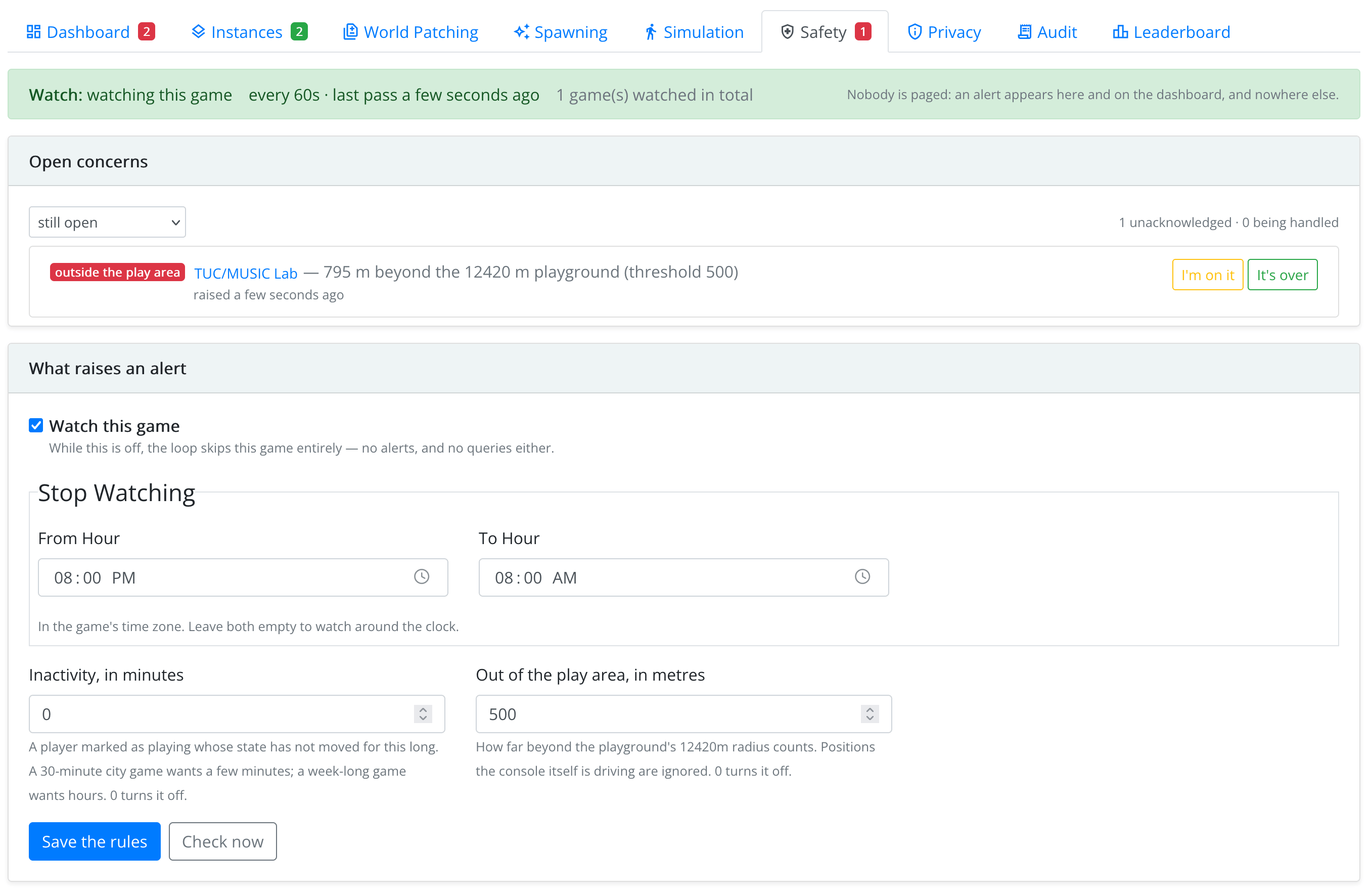
What Raises an Alert
| Setting | What it does |
|---|---|
| Watch this game | Turns the safety watch on for this game. While it is off, no alerts are raised. |
| Stop Watching (From Hour, To Hour) | Quiet hours, in the game's time zone, e.g. at night. Leave both empty to watch around the clock. |
| Inactivity, in minutes | How long a playing player's game may stay still before an alert. A 30-minute city game wants a few minutes; a week-long game wants hours. |
| Out of the play area, in metres | How far outside the play area a player may go before an alert. |
Save the rules to apply them. The watch runs on its own every few minutes; Check now runs it at once.
Open Concerns
Alerts are listed worst first, with the player, the instance and the details (e.g. how long the player has been inactive, or how far out they are). Click a player to open their player detail, where you can see where they are and send them a message.
- Acknowledge means a game master is on it. The alert stays in the list.
- Resolve means it is over. If the problem is still there at the next check, a new alert is raised.
An alert also closes on its own when its cause goes away, e.g. the player moves again. Use the filter to see alerts that are not acknowledged, still open, acknowledged, recently resolved, or everything kept.